Mobile document hub for viewing, editing, signing, and scanning
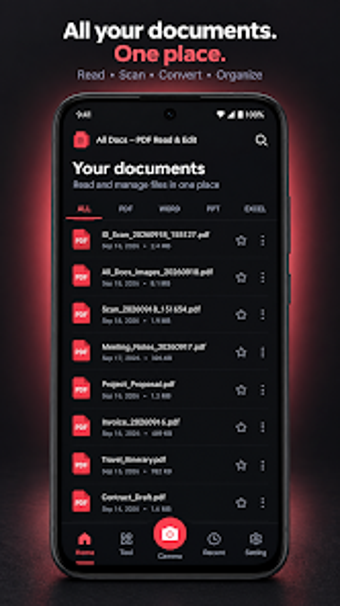
Opens and edits PDFs, Word, Excel, and PowerPoint files while combining a viewer, editor, and scanner into one workflow. All Docs - PDF Read & Edit, from Gnurt, targets students, freelancers, and office professionals who need fast mobile document handling. Key functions include offline reading, merge and split for PDFs, a camera scanner, image-to-PDF conversion, and a drawn digital signature tool. The app’s small installer and high-speed loading suit on-device work away from a desktop.
Handles multiple office formats without external suites
All Docs opens PDF, DOC/DOCX, XLS/XLSX, and PPT/PPTX files and does so without requiring Microsoft Office. That lets a user review mixed-format deliveries on a single device, and the built-in full-text search finds terms inside documents. The app’s universal viewer removes the need to switch apps when a briefing bundle contains spreadsheets, slides, and contracts.
Supports common PDF workflows required in field work
The app provides PDF merge, split, and page reordering, and it includes a digital signature tool that lets you draw and place a signature on PDFs. Those functions let a consultant assemble deliverables and sign contract pages from the device. Image-to-PDF conversion and a camera-based document scanner with cropping and cleanup complete the mobile paper-to-digital loop.
Designed for fast, offline performance and small installs
The installer size of about 13 MB and stated high-speed loading target users who need quick access to large files on standard business hardware. The app operates fully offline, so documents remain on the device. It requires All Files Access on newer Android versions to manage local storage, which is relevant for teams that control device permissions centrally.
Who should deploy All Docs in a mobile workflow
All Docs suits individual contributors and small teams that need a lightweight, offline-capable document hub on Android. It combines viewer, editor, scanner, and signature tools into a single app; however, it does not replace full desktop suites when advanced formatting or macros are required. Use the app for on-the-go review, signing, and quick conversions rather than heavy document production.